
SAP Analytics Cloud (SAC) cannot import parameterized CDS views. The mismatch between SAC’s import requirements and the dynamic execution of parameterized CDS views creates a structural limitation. This is not a bug. Parameterized CDS views let developers pass runtime values – such as fiscal year, company code, or controlling area – into a view. These values shape the data dynamically. While they work perfectly in ABAP development environments, BW systems, or Embedded Analytics, SAC import models require static, predictable datasets.
As a result, attempts to import parameterized CDS views often fail late in projects, causing delays and rework. Understanding this limitation early and designing CDS views specifically for SAC consumption prevents failed data models, redesign cycles, and blocked finance reporting.
What Is a Parameterized CDS View?
A parameterized CDS view is a CDS artifact that requires one or more input parameters at runtime. The system evaluates these parameters when it executes the view and uses them to directly influence:
- Which records are read
- How measures are calculated
- How data is filtered or aggregated
From an ABAP or BW perspective, this works perfectly. The system executes the view only when you provide parameters, and it generates the result dynamically.
However, this execution model clashes with how SAC import works.
How SAC Import Models Work
- Read metadata (dimensions, measures, data types)
- Retrieve a fixed dataset
- Persist the data in SAC storage
- Schedule future reloads using the same structure
- A predictable result structure
- A static dataset at load time
- No dependency on user interaction or runtime input
Parameterized CDS views violate all three requirements.
For more details, see SAC import vs. live connection: when to use each.
The Core Problem: Runtime Dependency
Parameterized CDS views do not exist in a meaningful way without parameters.
From SAC’s perspective:
- There is no default dataset
- There is no guaranteed row set
- There is no stable semantic definition
SAC cannot “guess” which parameter values to use, nor can it store multiple parameterized results in a single import model.
As a result, SAC simply blocks the import.
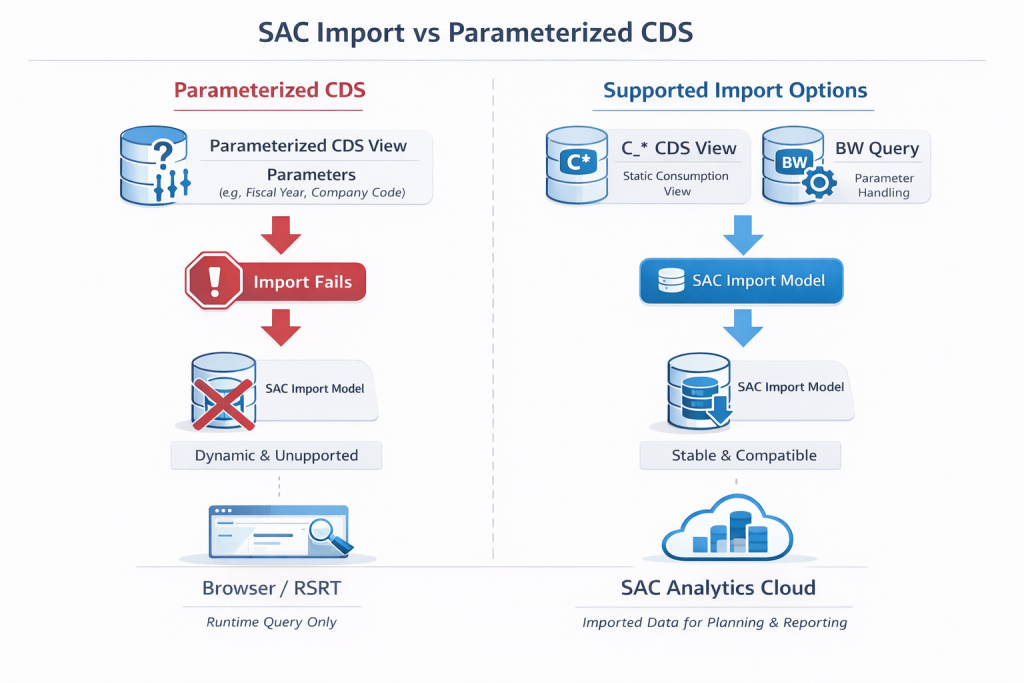
Typical symptoms include:
- No option to create an import model
- Metadata read failures
- Generic “data source not supported” messages
For systematic troubleshooting, refer to debugging SAC import failures: a systematic approach.
Why This Is a Design Limitation (Not a Bug)
This behavior is intentional.
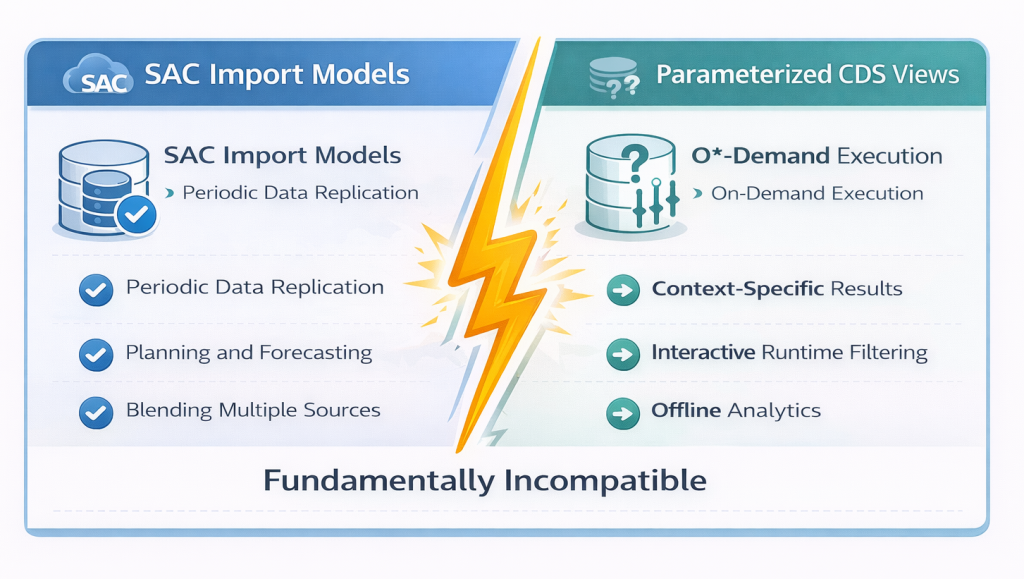
| Common Misconception | Reality |
|---|---|
| “If the CDS works in SAP GUI or BW, SAC should be able to import it.” | SAC cannot import parameterized or certain types of CDS views. SAC is not a generic CDS execution engine – it is a data consumer with strict requirements. |
| “All CDS views that work in ADT, RSRT, or Embedded Analytics can be imported to SAC” | Many of these views are not valid SAC import sources due to parameterization or other structural characteristics. |
| “This is a bug that will be fixed” | This is a fundamental design principle of how SAC import models operate. |
What Works Instead
| Option | Description / Why it Works | Best Practices / Notes |
|---|---|---|
| 1. Non-Parameterized Consumption CDS Views | CDS views without mandatory parameters; stable metadata; predictable result sets; compatible with SAC import. Often follow C_* naming convention but any parameterless analytical view works. | Push business logic into CDS; replace parameters with filters or derived fields; expose only analytics-ready views to SAC. |
| 2. BW Query as an Intermediary | Wrap parameterized CDS in BW Query; resolves parameters inside BW; returns a stable dataset; looks static to SAC | Especially useful if parameterization is unavoidable; common in S/4HANA Embedded Analytics landscapes |
| 3. OData for Live Consumption (Not Import) | Use OData for scenarios requiring parameters; live connection preserves parameterization; no data persistence in SAC | Avoid import models entirely; suitable when data must be filtered at runtime |
Typical Architecture Pattern
| Layer | Artifact | Purpose |
|---|---|---|
| Data | Tables / Basic CDS | Raw data |
| Semantic | I_* / A_* CDS | Reusable logic |
| Consumption | C_* CDS | SAC import |
| Runtime (optional) | BW Query | Parameter resolution |
| Fronted | SAC | Reporting & planning |
Common Mistakes to Avoid
- Exposing parameterized CDS views directly to SAC – This will always fail for import models
- Using I_ or A_ views with parameters for import models – These interface/analytical views often contain parameters unsuitable for import
- Mixing live and import expectations – Understand which connection type supports your use case
- Debugging SAC instead of the CDS design – Most SAC “import problems” are actually modeling problems upstream
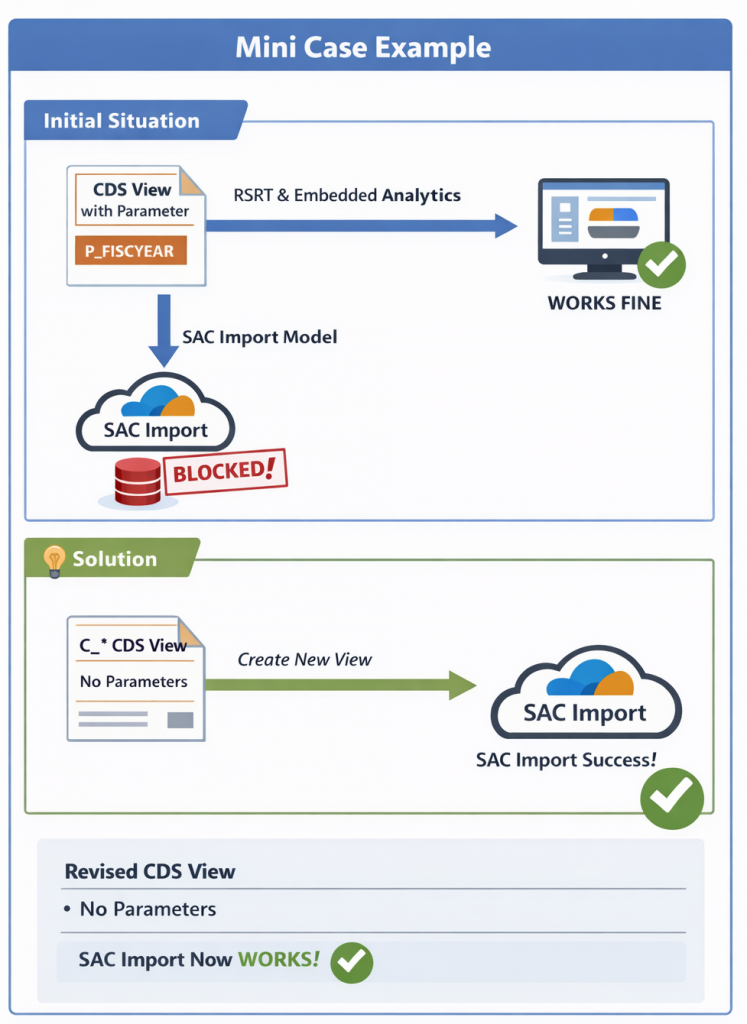
Key Takeaway
SAC cannot import from parameterized CDS views because:
- SAC import requires static datasets
- Parameterized CDS views are dynamic by design
- The two execution models are incompatible
The solution is not to “fix SAC,” but to design CDS views specifically for SAC consumption.
Conclusion
Parameterized CDS views are powerful-but not for SAC import.
If SAC import is part of your architecture:
- Avoid mandatory parameters in consumption-layer CDS views
- Use parameterless consumption views (often C_* pattern)
- Introduce BW only where necessary for parameter resolution
Designing CDS with SAC in mind from the start will save time, reduce rework, and ensure reliable finance analytics.
FAQ
Can SAC live models use parameterized CDS views?
Yes. Parameterized CDS views work with OData or BW Query live connections, where parameters can be passed at runtime.
Will SAP change this limitation in the future?
Unlikely. This is a structural design principle of SAC import models, rooted in how the import mechanism persists and schedules data.
Next, we will review how to design lean, performant CDS views optimized for SAP Analytics Cloud.