
In a prior blog series, I discussed how the Cloud Consolidation Extension for SAP Analytics Cloud conducts detailed currency conversion and automates the eliminations through the consolidation process. A series of blogs (blog 1, blog 2, blog 3, blog 4) covered the automated eliminations. We will post subsequent blogs about scope and ownership changes, as well as the staging method of consolidation.
However, in this blog post, I will be describing the process of Intercompany Matching and booking, which can be executed before and/or after the consolidation process (basically, after loading the standalone data into the Cloud Consolidation model on SAP Analytics Cloud)
What is the Intercompany Matching Model?
The Intercompany Matching Model allows group companies to reconcile their intercompany transactions. Companies can check what their partners have booked and compare it with their own records. In other words, SAP Intercompany Matching model provides the group companies with the visibility to reconcile their intercompany transactions against the values booked against them by their partner companies.
For example, entity A records a receivable of 100 USD from entity B, in turn, entity B should records a payable of 100 USD to entity A. If this is the case, the Consolidation model will eliminate the values and there would not be any residual value between the two companies. However, this might not always be the case. Company B might miss to record the payable amount or might record a different amount.
Limitations of the Consolidation Model
In the Consolidation Model, Entity A and Entity B cannot see what their partners have recorded against them (unless the same user has access to both companies). To allow Entity A to see what Entity B has booked against it – and vice versa – we transfer the values to the IC Matching Model. The logic allocates intercompany transactions from all partners to the entity under ‘Their Liabilities/Expenses’ and ‘Their Assets/Income’.
Example Scenario
To make this relevant, lets consider the following Scenario, as depicted in below screenshot:
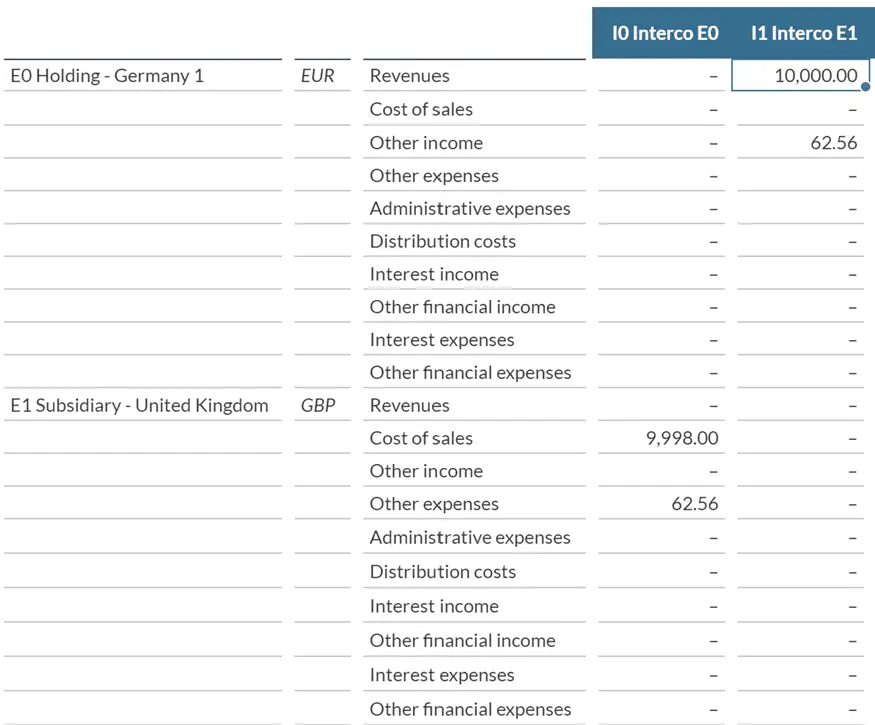
E0 has the following intercompany transactions with E1
- Revenues: 10,000
- Other Income: 62.56
Meanwhile, E1 recorded the following intercompany transactions with E0
- Cost of Sale: 9,998
- Other Expenses: 62.56
Needless to say, the employee in E0 cannot see the values in E1, and vise versa. Last, the local currency of E0 is Euro (EUR), as for E1, it’s local currency is British Pounds (GBP).
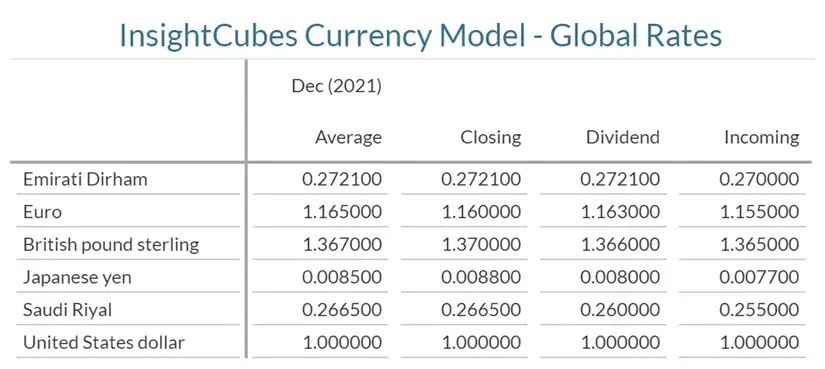
The currency conversion rates, as of the month of these transactions, are as below (Detailed explanation of the comprehensive currency conversion can be seen in this blog
Running Intercompany Matching
Once the user clicks on Run Intercompany Matching, the system will convert the values from the local currencies of their respective entities to the multiple desired reporting currencies, and push these converted values into the IC Matching Model on specific Audit Trail members, using a sequence of logic to allocate and book differences.
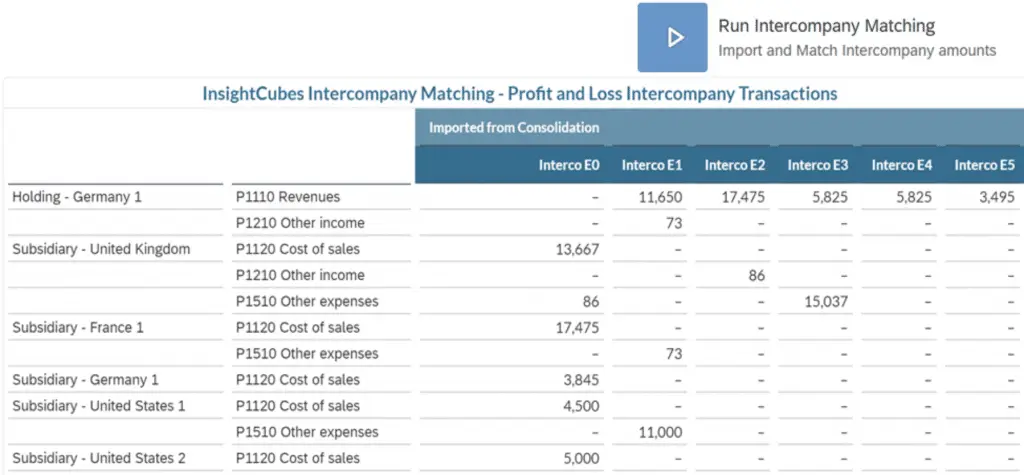
The screenshot shows the converted values imported into the IC Matching Model under the Audit Trail member ‘Imported from Consolidation.’ The values display in USD, but you can use any reporting currency. E0 had 10,000 EUR (its local currency) of Revenues from E1, this amount is now showing as 11,650 USD (Eur Conversion rate for Average is 1.65 to the dollar). Meanwhile E1 had 9,998 GBP (E1’s local currency) of Cost of Sales from E0, this amount is now showing as 13,667 USD (GBP conversion rate for Average is 1.367 to the dollar).
Allocating Values for Visibility
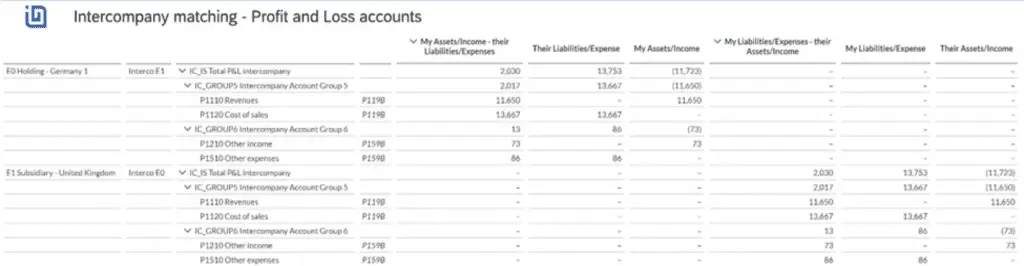
The next step in the logic allocates the values so that users from E0 can see what their partner companies have booked against them and reconcile any differences. In the below screenshot, we can see that the COGS intercompany transaction in E1’s books against E0 is now showing in E0 books under “Their Liabilities/Expense” for the value of 13,667 USD, meanwhile the Intercompany Revenue which was originally in E0’s books against E1 is showing under My Assets/Income.
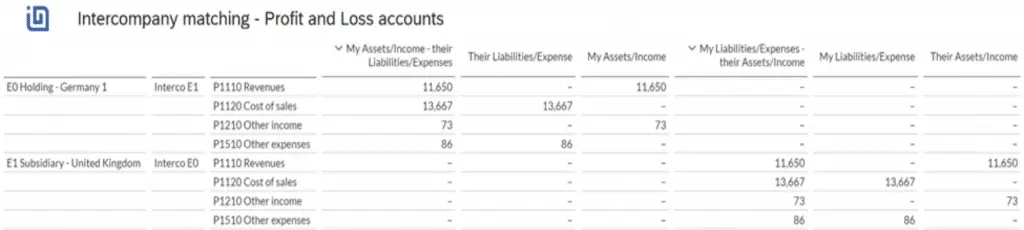
As shown in the Intercompany Elimination, we group a set of intercompany accounts with clearing accounts. Revenue and Cost of Sales have the same clearing account P119B. This account would show differences in the Consolidation Model if the intercompany elimination ran. Grouping Revenues and Cost of Sales under the parent ‘IC_GROUP 5’ shows a difference of 2,017 USD between what E1 recorded as Cost of Sales toward E0 and what E0 recorded as Revenue against E1.
If you look at the value 13,667 USD, you will find it under “Their Liabilities/Expense” for E0, and you will also see it under “My Liabilities/Expense” for E1. This allocation logic moves data from the Consolidation Model to the Intercompany Matching Model, letting companies see partners’ bookings and reconcile them with their own records.
Booking Differences
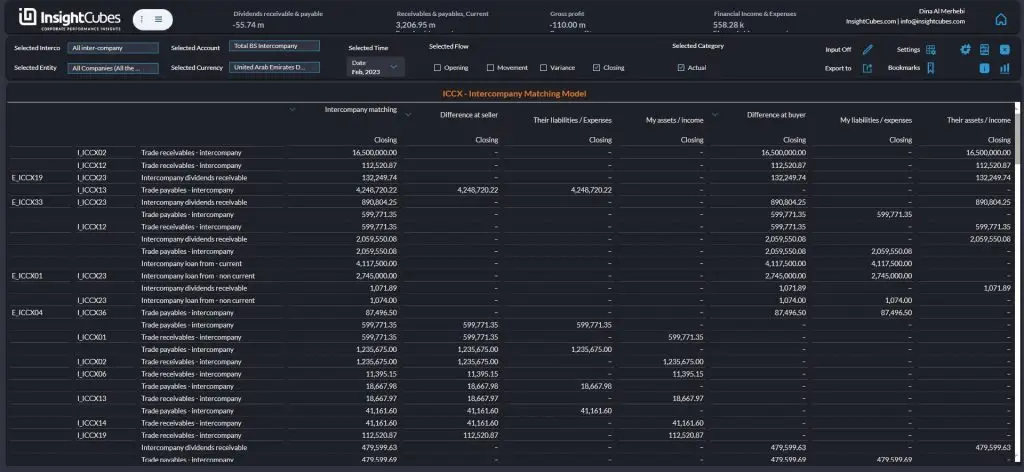
The last step is to book the differences to the seller, buyer or greater using another audit trail member called IC_Difference. This is achieved by assigning an attribute value to a set of intercompany accounts with same clearing account (or their parent account) to designate the method of booking the difference (Seller, buyer, greater)
There you have it – now you should know how to perform SAP intercompany matching with our software.