
Introduction
In the prior blog, I described how the detailed currency conversion works on the Cloud Consolidation Extension for SAP Analytics Cloud. This blog covers automated eliminations and adjustments triggered during consolidation. Due to the content size, I will break this topic into smaller, bite-sized blogs.
InsightCubes Consolidation extension for SAP Analytics Cloud comes preconfigured with consolidation methods and elimination rules that cover over 80% of IFRS requirements. This setup draws on 14 years of experience developing consolidation solutions for holding companies with subsidiaries and affiliates across industries.
Automation and Configuration
All eliminations and automated adjustments use data action triggers linked to advanced formulas and logic. These triggers run purely on member attributes (except one logic for net income). You do not need to write code if requirements fall within the defined rules. Assigning attributes to accounts, entities, scopes, and intercompany members is sufficient. This can be done using the Configuration Toolkit.
You can easily add additional automated elimination rules to another version of the data action trigger.
Automated Eliminations Logic
This blog covers automated elimination based on different consolidation methods, with each elimination following a specific sequence of logic. From a technical perspective, we selected a subset of these eliminations to showcase sequential data manipulation methods for generating eliminated values.
- In some cases, the system picks the values from the entity’s intercompany breakdown and posts them to the entity.
- In other cases, the system applies the logic between the entity and its intercompany.
- In additional cases, the system does not use the intercompany breakdown in the calculations at all.
Furthermore, some logic will knock off a set of accounts and reflect their residual value, while other logic would have a three leg entry. From a technical perspective, you can reuse the combination of these data manipulation methods to create any set of eliminations and adjustments. Since the system works on attribute values rather than fixed members, adding new attributes and applying the existing formulas allows you to compose the logic as needed.
Account Properties Example
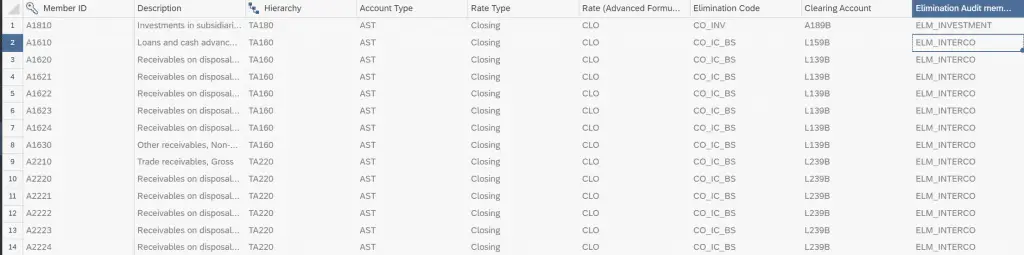
The screenshot above highlights three properties in the account dimension.
The Account A1810 has a property value of CO_INV under Elimination Code and a clearing account A189B, with Elimination Audit member ELM_INVESTMENT. Assigning these property values to another account applies the rules to it. You do not need to change the Eliminations and Adjustments rules to apply the logic to your COA.
We can add new audit members in the Audit ID dimension and specify which member will host the elimination in the Elimination Audit Member column, all without changing the rules. The system then automatically writes the results back to the destination audit member based on the account dimension assignment.
Other properties in the intercompany, entity, scope, flow, and currency dimensions work the same way. No additional coding is needed. You can adopt the solution and apply your master data directly.
By just maintaining the properties values for the master data, you would have configured over 90% of the solution. Few calculations are based on fixed accounts (Such as retained earning – E1610 or Net income (loss) attributable to noncontrolling interest – P8000) and can be easily changed in the Advanced Formulas.
The system even highlights them with the text “Change Account ID here.”
Advanced Formulas and Scripts
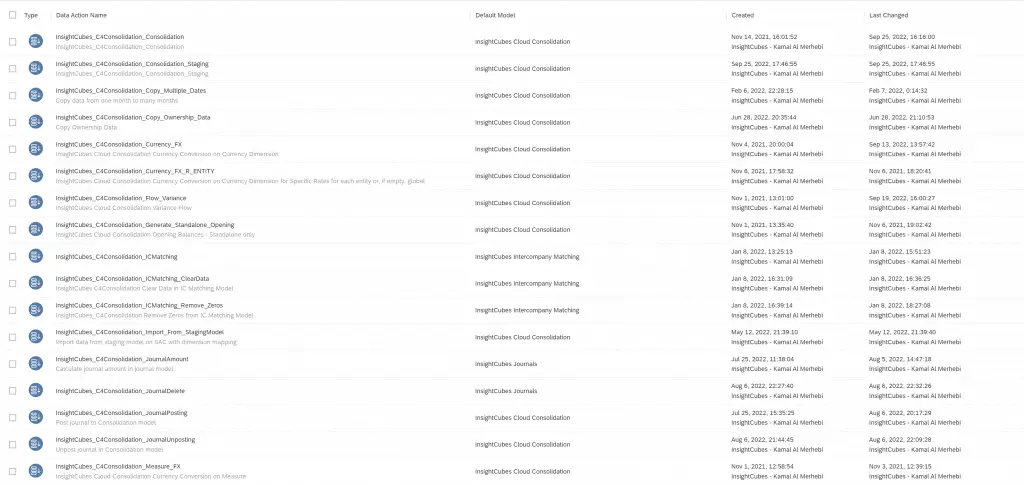
InsightCubes Consolidation Extension for SAP Analytics Cloud comes with an extensive list of Advanced Formulas and Java Script embedded in Analytics Applications that rely on each other. Each formula consists of multiple sequential steps.
For the same logic, you can select alternative methods.
For example:
- Run currency conversion based on global rates only, or both global and entity-specific rates.
- Run consolidation based on direct and indirect ownership, with or without staging.
All advanced formulas and preparatory scripts rely on the same architecture and member attributes, working consistently based on assigned property values.
Consolidation Methods
SAP Analytics Cloud’s Consolidation Extension provides four commonly used consolidation methods:
- Holding
- Full
- Equity
- Proportionate
The user enters the methods through the Ownership Manager interface. The selected method determines which rules run during the consolidation process. In the Managing Ownership Structure blog, we explain this in more detail. In the example below: Scope 1 being a parent scope to Scope 2 (this is not a hierarchy/Parent Child relationship), and within Scope 1, Holding Germany 1 is the holding company and the rest are subsidiaries (Full Consolidation method) except for France 2 being an affiliate (Equity Consolidation Method). The user entered the ownership and consolidation rates for each entity within Scope 1.
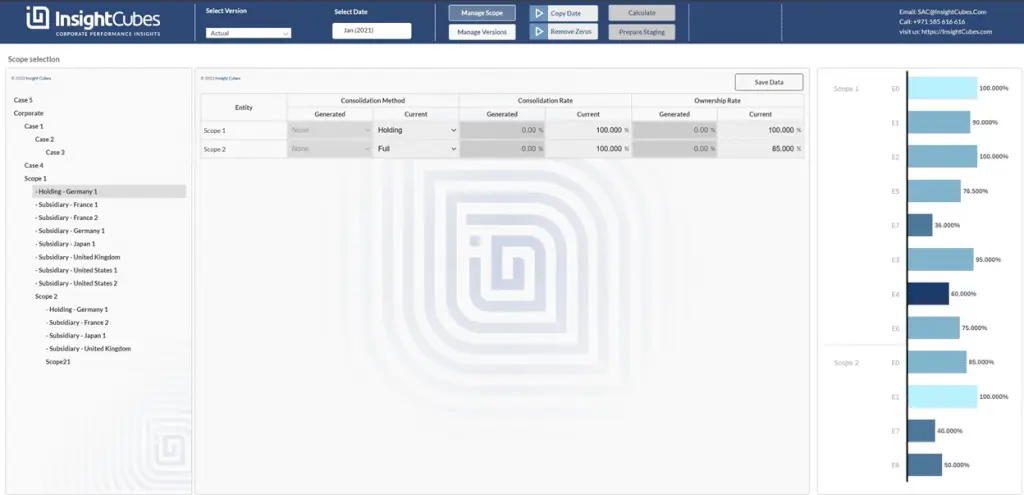
- The Holding method applies to the holding company within a scope. This is the investor company.
- The Full method applies to subsidiaries within the scope (investees under majority control of the holding company). These are the companies that the holding company has majority control over.
- The Equity method applies to affiliate companies within the scope (investees without majority control). These are the companies that the holding company doesn’t have majority control over. Only the equity pickup rule and investment revaluation apply to companies using the Equity method.
By assigning the methods through the ownership manager and clicking on Run Consolidation, the system should run all the sequence of logic to generate a set of fully consolidated financial statements based on the relationship between the entities within a scope.
Demonstrative Eliminations
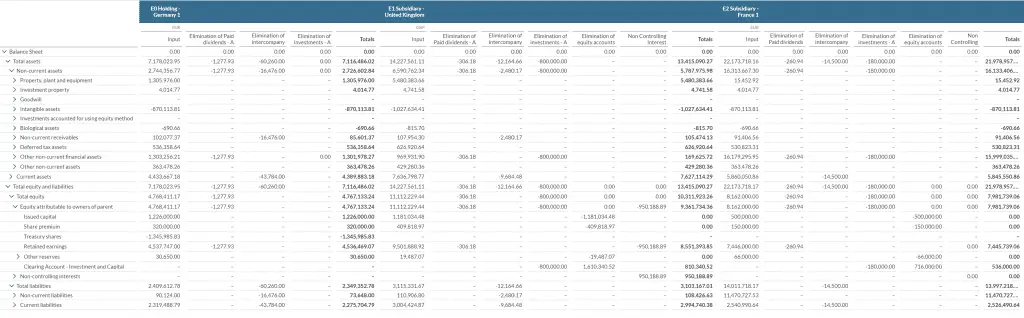
The eliminations used for this blog do not include:
- Share in earnings
- Hedging reserves
- Dividends paid
The system omits these values to maintain financial validity. Instead, this example demonstrates how eliminations work and how differences between investment and equity accounts, as well as intercompany transactions, are handled.
In the next blog, I will go in details on the first set of automated eliminations, the intercompany eliminations