
S/4HANA Embedded Analytics introduces a layered analytics architecture built on Core Data Services (CDS). One of the most common sources of confusion for SAP BI architects and developers is the distinction between I_ views, C_ views, and 2C_ queries.
These artifacts serve different purposes, target different consumers, and follow clear modeling rules. Misunderstanding them often leads to poor performance, broken reporting, or misuse of tools such as SAP Analytics Cloud (SAC).
This article explains what I_, C_, and 2C_ mean, how they relate to each other, and when to use each layer correctly.
Embedded Analytics Layered Architecture (Quick Overview)
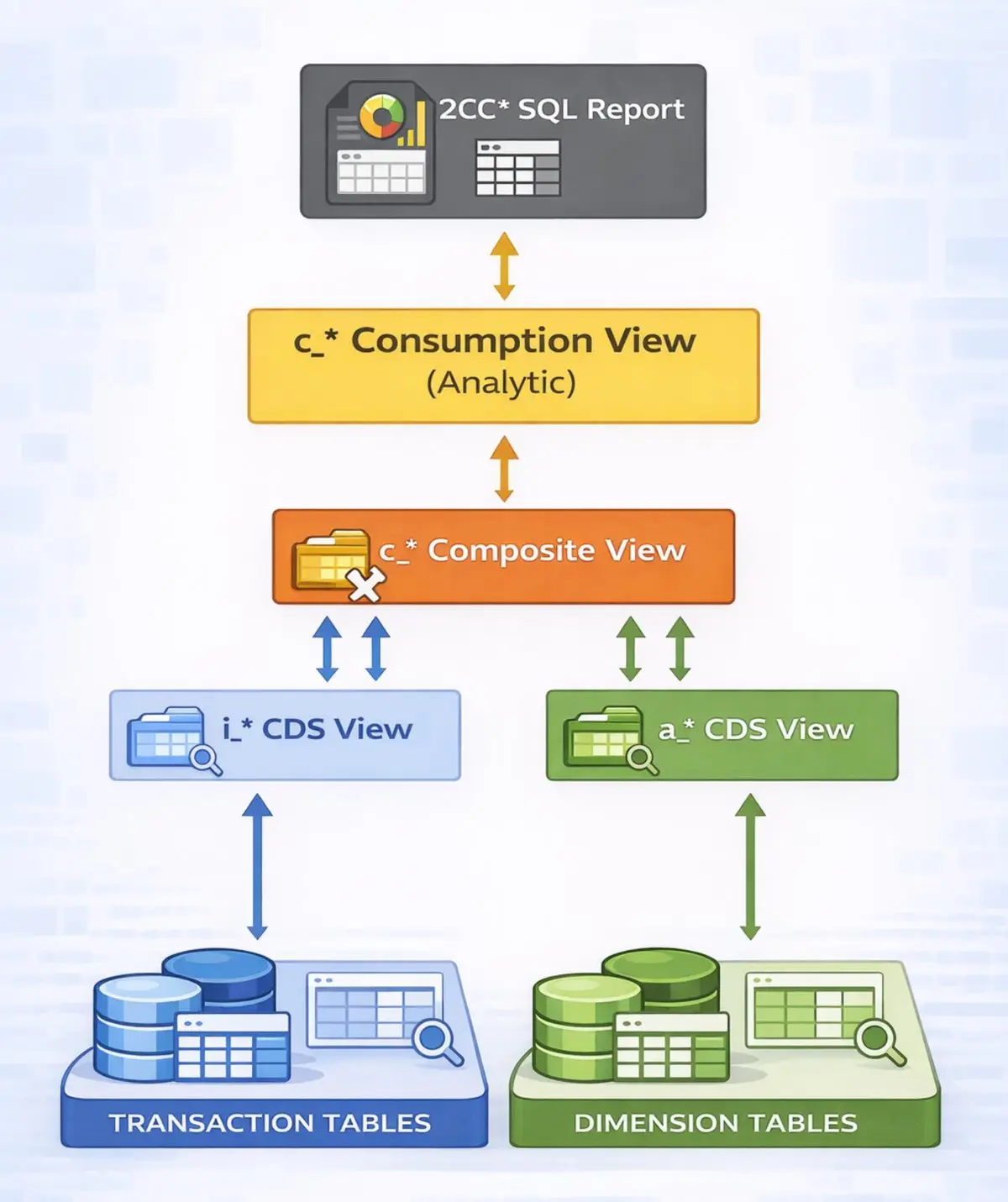
S/4HANA Embedded Analytics follows a virtual data model (VDM) approach with clear separation of concerns:
- Data Foundation – tables and basic interface views
- Reusable Semantics – business logic and harmonization
- Consumption – analytics-ready views and queries
I_, C_, and 2C_ belong to different layers of this architecture.
What Are I_ CDS Views?
Definition: I_ views (Interface Views) represent the reusable semantic layer of the Virtual Data Model.
They:
- Encapsulate business logic
- Harmonize data from multiple tables
- Are stable and reusable across applications
Key Characteristics:
- Prefix: I_
- Not end-user facing
- Not optimized for direct consumption
- Often used as building blocks for other CDS views
Typical Use Cases:
- Reuse in multiple C_ views
- Foundation for KPIs and analytical queries
- Extension points for custom logic
Example:
- I_JournalEntry
- I_SalesDocument
- I_FinancialStatementItem
Think of I_ views as the semantic backbone of Embedded Analytics.
What Are C_ CDS Views?
Definition: C_ views (Consumption Views) are designed specifically for end-user consumption.
They sit on top of I_ views and apply:
- Analytical annotations
- Business-friendly semantics
- Authorization handling
Key Characteristics:
- Prefix: C_
- Analytics-ready
- Can be consumed directly by SAC, Fiori apps, or Analysis for Office
- Contain UI and analytical annotations
Typical Use Cases:
- SAC Live models
- Fiori analytical apps
- Operational reporting
Example:
- C_SalesOverview
- C_FinancialStatement
- C_GLAccountLineItem
C_ views are what reporting tools are supposed to consume – not I_ views.
What Are 2C_ Queries?
Definition: 2C_ objects are BW queries generated on top of CDS views.
Despite the name, they are BW artifacts, not CDS views.
Key Characteristics:
- Prefix: 2C_
- Executed via the BW Analytical Engine
- Provide advanced BW features
- Often generated automatically by SAP
Why 2C_ Exists:
Some analytical features are still only available in BW, such as:
- Complex exception aggregation
- Advanced variables
- Certain performance optimizations
2C_ queries bridge CDS-based modeling with BW query capabilities.
Example:
- 2C_FIN_C01
- 2C_SALES_Q001
I_ vs C_ vs 2C_: Side-by-Side Comparison
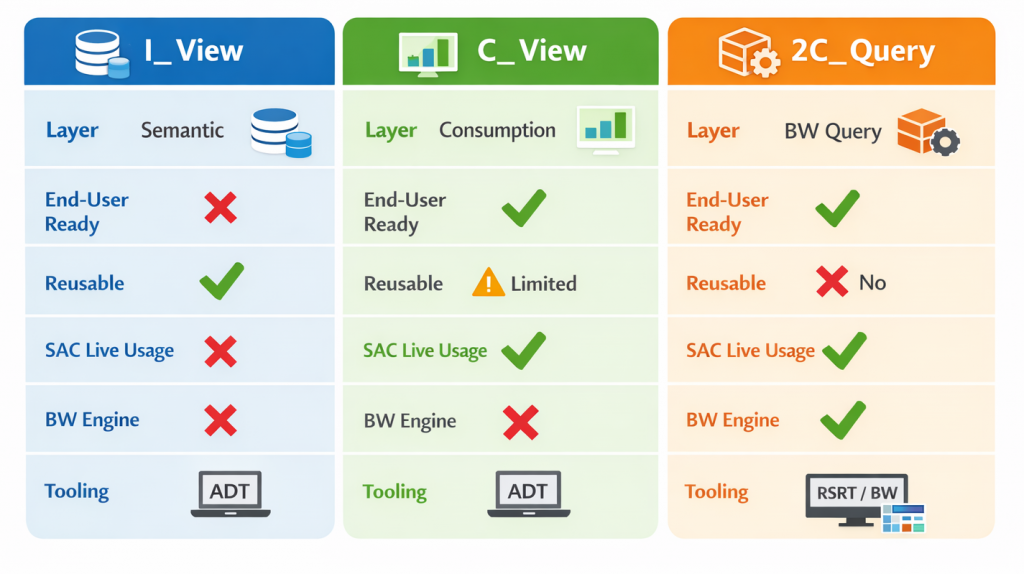
Which One Should You Use?
| Use I_Views When: | Use C_Views When: | Use 2C_Queries When: |
|---|---|---|
| – Modeling reusable business logic – Expecting multiple consumers – Maintaining a clean separation of concerns | – Building SAC Live models – Exposing analytics to business users – Creating Fiori analytical apps | – BW-specific analytical features are required – SAP standard content recommends them – Performance requires BW engine optimizations |
| Best Practices | Common Mistakes to Avoid |
|---|---|
| – Always consume C_ views for SAC Live and Fiori apps. – Use I_ views to centralize business logic for multiple consumption views. – Only rely on 2C_ queries if BW-specific features are required. – Avoid heavy logic in C_ views to maintain reusability and performance. – Use RSRT to analyze 2C_ query performance, and ADT for CDS development. | – Consuming I_ views directly in SAC – Extending C_ views with heavy business logic – Treating 2C_ queries as CDS artifacts – Ignoring RSRT when analyzing performance |
Tools You Should Know
- ABAP Development Tools (ADT) – for CDS modeling and extensions
- RSRT – for analyzing 2C_ query performance and variables
- SAP Analytics Cloud (Live) – primary consumer for C_ and 2C_ artifacts
Final Thoughts
Understanding the distinction between I_, C_, and 2C_ is essential for building scalable, performant, and supportable Embedded Analytics solutions in S/4HANA.
Each layer has a clear responsibility. When used correctly, they work together seamlessly. When mixed incorrectly, they create technical debt.
If you design with the layered architecture in mind, SAC Live analytics becomes predictable, performant, and future-proof.