
Introduction
SAP Analytics Cloud live queries are often described as real-time and push-down, but what actually happens behind the scenes when a user opens a live story or analytic application? Understanding the execution flow – from CDS views in S/4HANA, through BW Query runtime and RSRT, all the way to SAC- helps developers design performant models, troubleshoot issues faster, and avoid common pitfalls.
In this blog, we walk through how SAC live queries really work, focusing on the technical execution path from CDS to RSRT to SAC. We also highlight where performance is won or lost, and which tools you should use at each step.
What Is a SAC Live Query?
A SAC live query is executed directly on the source system at runtime. Unlike import mode, no data is persisted in SAC. Instead:
For S/4HANA Embedded Analytics, this means SAC ultimately relies on ABAP CDS artifacts and the BW Query runtime.
High-Level Architecture: CDS to SAC
At a high level, the execution chain looks like this:
Each layer adds specific responsibilities – and potential performance impact.
Step1: CDS Cube – The Analytical Foundation
Everything starts with a CDS Cube (or analytical CDS view) annotated for analytics, such as:
- @Analytics.dataCategory: #CUBE
- @VDM.viewType: #COMPOSITE
The CDS cube:
- Reads from transactional and master data tables
- Defines measures, dimensions, and associations
- Pushes calculations down to HANA
Key point: SAC never queries the CDS cube directly. A query-enabled CDS view (2C_) consumes the CDS cube.
Step2: Query-Enabled CDS (2C_) – Where Analytics Semantics Live
| Topic | Details |
|---|---|
| Tool / Layer | Query-Enabled CDS (2C_) |
| Role in SAC Live Query | Acts as the BW Query equivalent in Embedded Analytics. |
| Key Responsibilities | – Define filters and restricted measures – Create calculated measures – Set variables and prompts – Handle exception aggregation |
| Technical Note | Although modeled in ABAP CDS, this view is exposed as a BW Query. |
| Why It Matters | – SAC connects to the query, not the underlying cube – Query design directly affects SAC performance and flexibility |
The table below summarizes the key layers involved in SAC live queries and the primary tools responsible at each step.

Step3: BW OLAP Engine – The Real Execution Engine
| Topic | Details |
|---|---|
| Tool / Layer | BW OLAP Engine |
| Role in SAC Live Query | Once SAC triggers a live query, execution is handed over to the BW OLAP Engine. |
| Key Responsibilities | Interprets query semantics Resolves variables and filters Applies aggregations and calculations |
| Embedded Analytics Note | Even without classic BW modeling, the BW runtime is always involved. |
| Why SAC Live Queries Feel Like BW | – Variable processing order – Aggregation behavior – Currency and unit conversion logic |
Step4: RSRT – Your Best Friend for Analysis
| Topic | Details |
|---|---|
| Tool | RSRT (Report and Analysis Tool in BW) |
| Purpose | Primary tool to understand and debug SAC live queries |
| How it Works | When a SAC story runs a live query, the system executes the corresponding BW Query internally. You can run the same query directly in RSRT. |
| Key Capabilities | Compare SAC vs. BW results Analyze runtime and execution steps Enable trace and statistics Identify expensive calculations or joins |
| Best Practice | If a SAC live query is slow, always test it in RSRT first |
Step5: SAC Live Connection – Thin Client, Smart Consumer
SAC acts as a thin analytical client in live mode:
- Sends metadata and query requests
- Passes user filters and variables
- Renders results visually
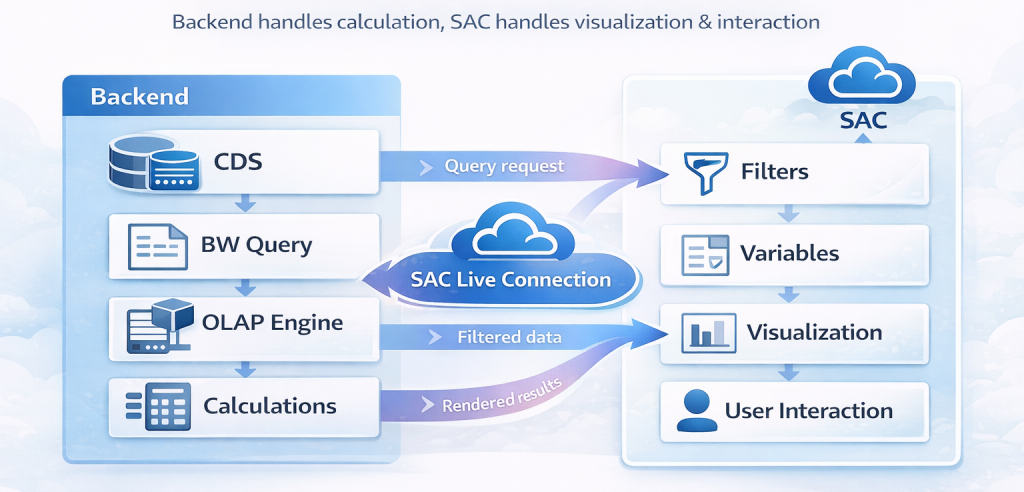
What SAC does not do:
- No heavy calculations
- No data persistence
- No re-aggregation of measures
This means performance is almost entirely determined by:
- CDS and query design
- BW runtime efficiency
- HANA execution plans
Common Performance Pitfalls
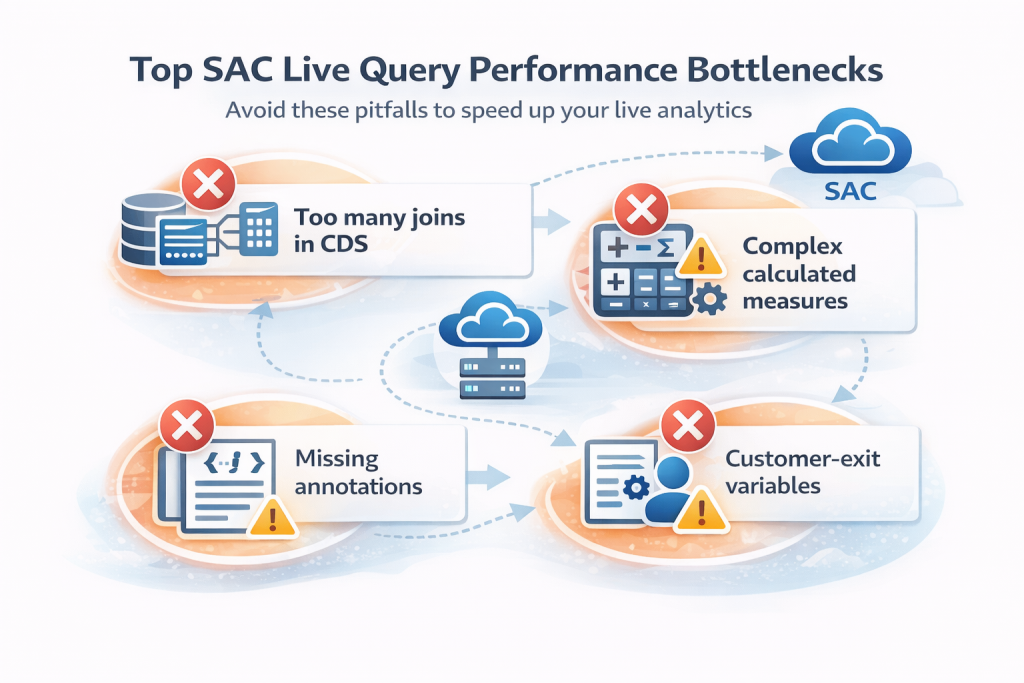
When working with SAC live queries, watch out for:
Why This Knowledge Matters for BI Leads
Understanding how SAC live queries work enables you to:
- Set realistic performance expectations
- Design scalable Embedded Analytics architecture
- Avoid unnecessary data replication
- Troubleshoot issues faster with the right tool
This knowledge is especially critical for BI leads working in S/4HANA Embedded Analytics landscapes, where they rely on CDS instead of classic BW models.
Conclusion
SAC executes live queries through a carefully orchestrated chain, from CDS to BW Query to RSRT to SAC. By understanding each layer’s role, you can design better models, deliver faster analytics, and debug issues with confidence.
If you treat SAC as a thin consumer and focus your optimization efforts on CDS and query design, you will get the most out of live analytics.