
Choosing between Live and Import (Load) connections in SAP Analytics Cloud (SAC) is one of the most critical architectural decisions organizations face when building analytics, planning, and reporting solutions.
This choice impacts performance, data governance, security, scalability, and total cost of ownership.
Despite this importance, the topic is often oversimplified. This guide provides a clear, technical, and practical explanation of SAC Live vs Load connections – and helps you decide when to use each.
Why the Live vs Load Decision Matters
At first glance, Live and Import connections may look like simple connectivity options. In reality, they define:
- Where the system processes data
- How the system enforces security
- Who owns data modeling
- How scalable and future-proof your SAC landscape will be
For CIOs and CFOs, this decision affects risk, compliance, and cost.
For SAC architects, it determines system design, performance, and user experience.
What Is a Live Connection in SAP Analytics Cloud?
A Live Connection means that data remains in the source system and is queried in real time when users interact with SAC stories.
Key Characteristics of Live Connections
- No data replication into SAC
- Queries executed directly in the source system
- SAC acts purely as a visualization and interaction layer
Supported Live Data Sources
- SAP S/4HANA (via CDS Views)
- SAP BW / BW/4HANA (via BW Queries)
- SAP HANA (Calculation Views)
Tools Commonly Used
- CDS Views
- BW Queries
- RSRT (for BW query performance analysis)
- Browser network trace for query diagnostics
Important: SAC performance in live mode depends entirely on the quality of backend modeling.
What Is an Import (Load) Connection in SAP Analytics Cloud?
An Import (Load) Connection copies data from the source system into SAC, where it is stored and processed internally.
Key Characteristics of Import Connections
- Data is physically stored in SAC
- Refresh occurs on a schedule or manually
- SAC handles aggregations, calculations, and planning logic
Supported Import Data Sources
- SAP S/4HANA
- SAP BW / BW/4HANA
- SAP HANA
- OData services
- Flat files
Typical Use Cases
- Planning and forecasting
- Data blending from multiple sources
- High-performance analytics for large user groups
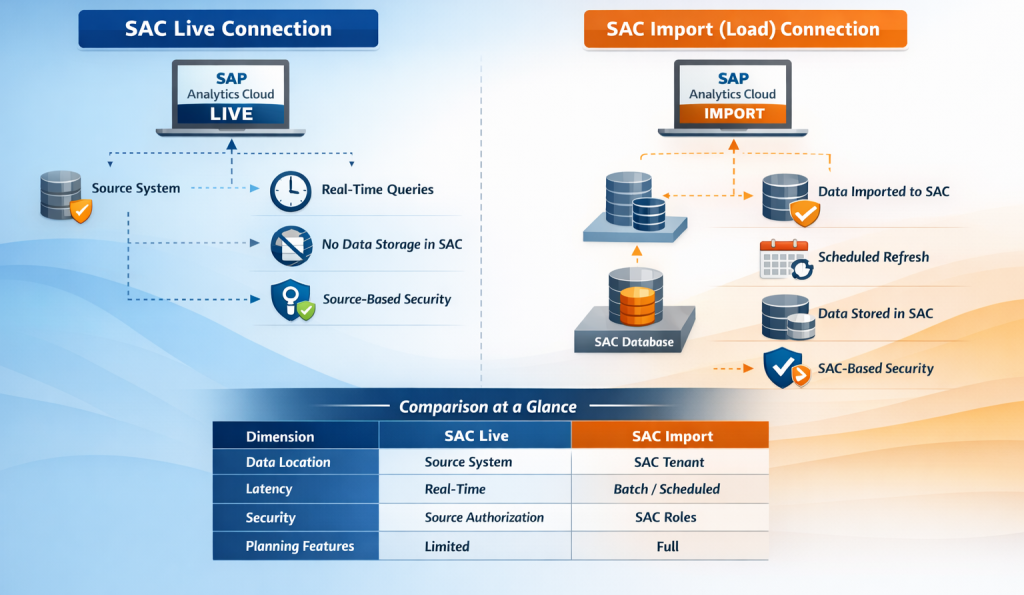
| Dimension | Live Connection | Import (Load) |
|---|---|---|
| Data location | Source system | SAC tenant |
| Data latency | Real-time | Near real-time / batch |
| Data volume | Source-driven | Tenant-limited |
| Data modeling | Backend (CDS/BW) | SAC model |
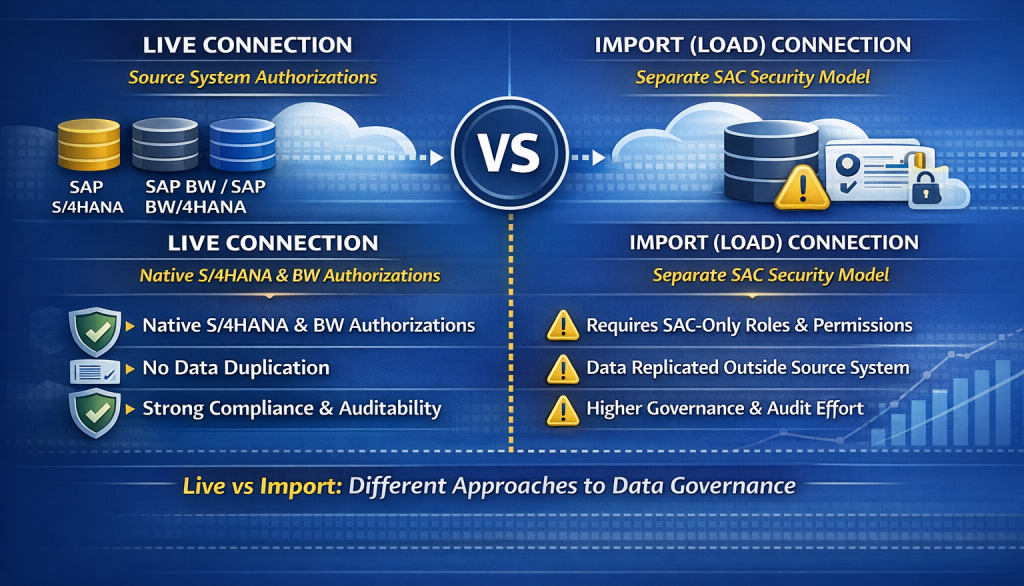
| Security | Source authorizations | SAC roles |
| Performance | Source-dependent | SAC – optimized |
Performance Considerations (Critical but Often Ignored)
Live Performance Depends on Backend Design
Live models perform well only if the source is properly modeled, including:
- Optimized CDS annotations
- Well-designed BW queries
- Correct variable usage
- Efficient joins and filters
Using RSRT for BW queries is essential to identify performance bottlenecks before blaming SAC.
SAP Analytics Cloud does not slow down live queries – it exposes backend inefficiencies.
Import Models Shift Processing to SAC
With import models:
- Aggregations run inside SAC
- Stories respond faster for high user concurrency
- Performance is predictable
However, this comes with:
- Data duplication
- Refresh dependency
- Increased governance effort
Planning, Write-Back, and Advanced Analytics
This is where the architectural difference becomes decisive.
| Capability | Live | Import |
| Financial Planning | Limited | Full |
| Write-Back | Restricted | Supported |
| Data Blending | Not supported | Supported |
| Predictive Features | Limited | Fully supported |
For organizations planning budgeting, forecasting, or simulations, Import models are usually mandatory.
Security and Governance Implications
When to Choose Live vs Load

Hybrid Architecture: The Enterprise Reality
In most enterprise landscapes, the best solution is not Live or Load – but both.
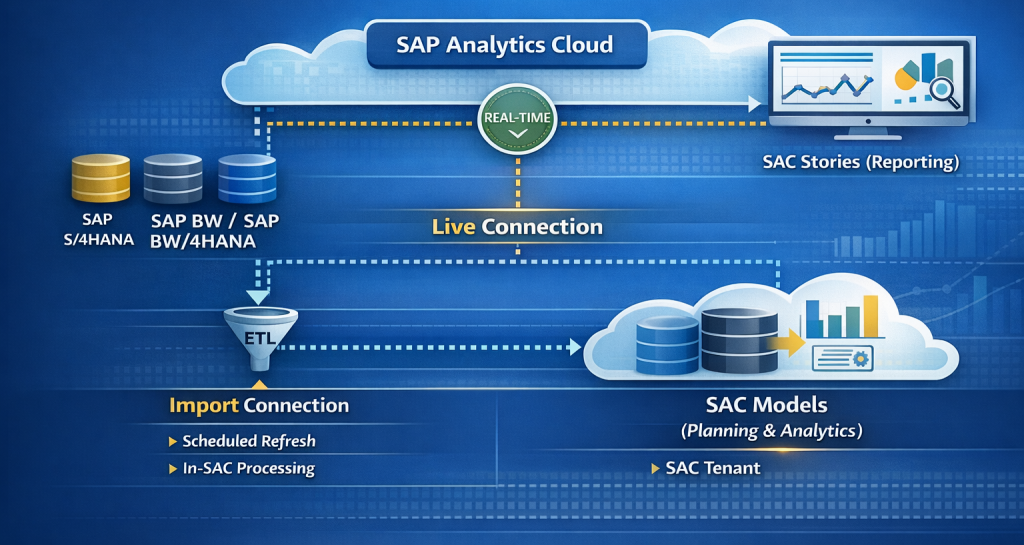
A hybrid SAC architecture typically looks like this:
- Live models for operational and statutory reporting
- Import models for planning, forecasting, and analytics
- Stories consuming both model types side by side
This approach balances governance, performance, and flexibility.
Common Mistakes to Avoid
- Using Import models to compensate for poorly designed BW queries
- Expecting full planning functionality on live models
- Underestimating security duplication in import scenarios
- Treating Live vs Load as a technical toggle instead of an architectural decision
SAP Artifacts and Tools Referenced
- SAP Analytics Cloud
- CDS Views
- BW Queries
- OData Services
- RSRT
- Browser network diagnostics
Conclusion: Live vs Load Is an Architectural Choice, Not a Preference
There is no universal winner between Live and Import connections in SAP Analytics Cloud.
The right choice depends on business requirements, governance strategy, and long-term SAP roadmap.
Organizations that succeed with SAC treat Live and Load as complementary capabilities, not competing options.