
Live connection (Online) and Import connection (batch) with SAP Analytics Cloud
SAP Analytics Cloud enables access to on-premise and cloud data sources using two main connection types: Live connection (Online) and Import connection (batch). Both access data from a variety of source systems.
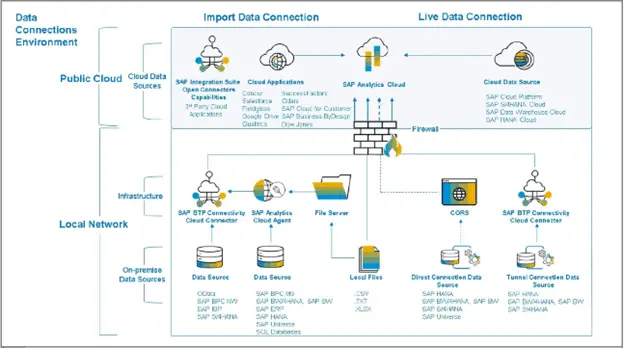
Live (Online) connection:
- Data remains stored exclusively in the customer’s on-premise database.
- SAP Analytics Cloud accesses data without importing it.
- Security in the on-premise system controls data access (the IDP)
- Data volume is processed in your backend system.
- A query is executed in the backend system.
With a live (online) connection, data is not replicated from the customer’s on-premise database into SAP Analytics Cloud. Instead, only the model metadata is stored in SAP Analytics Cloud, while query execution happens directly on the source system and the results are delivered to the user’s browser in real time. When the user changes the query/filter parameters, their browser sends those queries through a live connection to the on-premise data source. Users can create models from data sources in on-premise or cloud systems, build stories based on those models, and perform online analysis without any data replication.
With live connections, you can create models from data sources in on-premise or cloud systems, build stories based on those models, and perform online analysis without storing your data in the cloud. This feature enables organizations to use SAP Analytics Cloud when security or privacy requirements prevent data import into the cloud, or when the data already resides in another cloud system.
Types of Live Connections
There are three options for creating live connections:
- Direct Connection (CORS)
- Tunnel Connection
- Reverse Proxy
For live connections, SAP Analytics Cloud provides SAML 2 capabilities to enable single sign-on, simplifying not only authentication to SAP Analytics Cloud, but also to connected data sources from your landscape.
SAP Analytics cloud can have direct/CORS connection with SAP HANA, SAP BW4HANA, SAP S4HANA and SAP Universe. This connection is the fastest because it transfers data directly from the source system to the user’s browser, while SAP Analytics Cloud sends the metadata straight to the browser as well-hence the term “Cross-Origin Resource Sharing.”
A tunnel connection requires you to install the Cloud Connector on the data provider’s network or use the SAP BTP Connectivity Cloud Connector. This configuration allows the transfer of data from the source system to SAP Analytics Cloud temporarily, then subsequent transfer from SAP Analytics Cloud to the user’s browser. For this reason, it has a lower speed. Furthermore, data will be leaving the customer’s network in a secure tunnel connection, which doesn’t require the users to have VPN when they are outside the network. This form of connection covers SAP HANA, SAP BW/4HANA and SAPS4/HANA.
The last type of live connection is the reverse proxy, which basically required installation of a dispatcher in the TMZ. The dispatcher will “push” the data from the customer’s network to the public network, exposing all data and meta data to the public network.
Import (Batch) Connection:
Import data connections allow extended modeling by bringing actual data from the customer’s on-premise database into SAP Analytics Cloud. You can schedule these connections to keep SAC synchronized with the database timestamp through regular data refreshes.
- The system imports (replicates) data from the customer’s on-premise database into SAP Analytics Cloud.
- Security in SAP Analytics Cloud controls data access
When integrating data from on-premise source systems, a minimum requirement entails employing the cloud connector, though specific cases necessitate configuration of the Cloud agent as well. The installation of the Cloud Connector kit includes Apache Tomcat. For scenarios where data sources span distinct networks, installation and configuration of both the cloud connector and agent are essential within each customer network.
Role of the Cloud Connector
The Cloud Connector seamlessly merges effortless setup with transparent system configuration, thereby exposing them to SAP Analytics Cloud. Additionally, you gain control over resource allocation for cloud applications in these systems. This approach enables you to leverage your existing assets without compromising the integrity of your internal landscape.
Operating as an on-premise agent within a secure network, the Cloud Connector functions as a reverse invoke proxy. It facilitates communication between the customer domain’s on-premise network and SAP Analytics Cloud. The reverse invoke capability eliminates the need to configure the on-premise firewall for external cloud-to-internal system access.
Serving as the bridge between SAP Analytics Cloud and on-premise systems, the SAP BTP Connectivity Cloud Connector streamlines data integration. It combines a user-friendly setup with transparent system configuration, fostering exposure to SAP Analytics Cloud. This setup also empowers you to manage resource allocation for cloud applications in these systems. Consequently, you can harness your existing assets without compromising the confidentiality of your entire internal landscape in relation to SAP Analytics Cloud.
Required Connections Using Cloud Connector:
You must use the Cloud Connector when importing data through the following connections:
- OData
- SAP BPC Netweaver
- SAP IBP
- SAP S/4HANA
For the following connections, you must configure the Cloud Agent together with the Cloud Connector:
- SAP BPC MS
- SAP BW/HANA & SAP BW
- SAP HANA
- SAP ERP
- SAP Universes
- SQL database – specific JRE files for different types of databases
- Import data from a file server (CSV, TXT, and XLSX)
Importing data from 3rd party data sources residing on the Public Cloud requires the configuration and operation of SAP Integration Suite Open Connectors. These 3rd party data sources can include the following:
- Concur
- Salesforce
- Fieldglass
- Google Drive
- BigQuery
- Qualtrics
- Business Intelligence platform Universe (UNX)
- SuccessFactors
- Odata
- SAP Cloud for Customers
- SAP Business ByDesign
- Dow Jones
Depending on their needs, customers need to decide which connection type suits their needs best considering the following:
- Functional needs
- Data Privacy needs
- Data volume constraints
How to choose a Connection Type:
| Direct Live Connections | Tunnel Live Connections | Import Connections |
|---|---|---|
| – Performs analysis without data replication. – Confidential data stays in customer landscape. – Data security implemented in the source system is respected. – Leverages existing investments built in source systems. – Complex data modeling is performed centrally by IT. – Low latency – near real-time. – End-to-end SSO via SAML. | – Ideal if your organization wants to expose some of your data to users outside of your corporate net-work, without giving them VPN rights or setting up complex networking components. – Data is temporarily moved to the SAP Analytics Cloud. – Tunnel connections are slower than direct live connections. – CORS configuration is not required in the on-premise environment – Tunnel connections are not supported for live connections to universes. | – Leverage full SAP Analytics Cloud capabilities such as planning and smart predict. – Best for data preparation and data blending scenarios. – Scheduled data replication. |